Saturday, July 9, 2016

How To Catch Pikachu As Your Starter In Pokemon GO!

Pickachu, I choose you!

There've been rumors going around that you'll be able to catch Pikachu as one of your starting Pokemons in Pokemon GO! Just like Ash Ketchum, you too can start with a Pikachu of your own and the video below will show you how:


Instead of tapping one of the original Pokemon starters, we need to walk away from them and make them respond 4 to 5 times. Pikachu will then appear along with the 3 original starters and you will then be able to catch him with your Pokeball.

Monday, March 21, 2016

Top 3 Books For Learning iOS Development

http://amzn.to/1Zi1Eu7 
  iOS Programming: The Big Nerd Ranch Guide leads you through the essential concepts, tools, and techniques for developing iOS applications. After completing this book, you will have the know-how and the confidence you need to tackle iOS projects of your own. Based on Big Nerd Ranch's popular iOS Bootcamp course and its well-tested materials and methodology, this bestselling guide teaches iOS concepts and coding in tandem. The result is instruction that is relevant and useful. 


http://amzn.to/1RaXrFI 
 Move into iOS development by getting a firm grasp of its fundamentals, including the Xcode IDE, the Cocoa Touch framework, and Swift 2.0—the latest version of Apple's acclaimed programming language. With this thoroughly updated guide, you'll learn Swift’s object-oriented concepts, understand how to use Apple's development tools, and discover how Cocoa provides the underlying functionality iOS apps need to have.


http://amzn.to/1RaXDEX
If you’re grounded in the basics of Swift, Xcode, and the Cocoa framework, this book provides a structured explanation of all essential real-world iOS app components. Through deep exploration and copious code examples, you’ll learn how to create views, manipulate view controllers, and add features from iOS frameworks.

Friday, March 4, 2016

How To Play Clash Royale on Your Mac Using Genymotion


After being soft launched a couple of months ago, Supercell's MOBA + CCG hybrid mobile multiplayer game Clash Royale has been finally released worldwide this week on both iOS [AppStore] and Android [Google Play]. But if you don't own any mobile device, you can still play Clash Royale on your Mac using the android emulator Genymotion. To help you accomplish this, you can follow the steps described below:

1.  Download Genymotion here.
 
2. Download VirtualBox for Mac here.

3.  Download Genymotion ARM Translation zip file here.

4. Download Google Play for Android 4.3 zip file here.

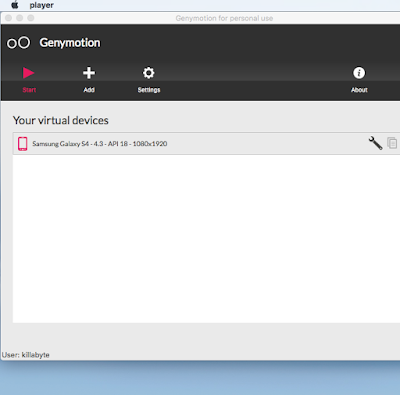
5. Install Genymotion and VirtualBox. Open Genymotion, click Add and choose Samsung Galaxy S4 4.3


6. Click Run to start device emulator. Login using GoogleID account when prompted.

7. Drag and drop the Genymotion ARM Translation zip file onto the device. Click Ok when prompted to flash the device. After the operation is finished, restart the device (close and then open it).

8. Drag and drop the Google Play for Android 4.3 zip file onto the device. Click Ok when prompted to flash the device. After the operation is finished, restart the device (close and then open it).

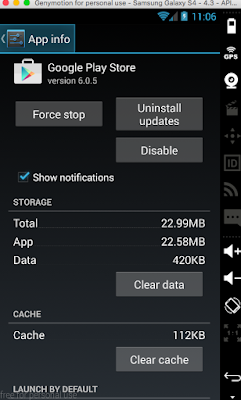
9. Open Google Play and search for Clash Royale to install the game. (If you encounter a "Device not compatible" error message, click on the device Settings -> Apps -> Google Play Store -> Clear Data. Then go back again to Google Play and you will find that Clash Royale can now be installed on your device.)


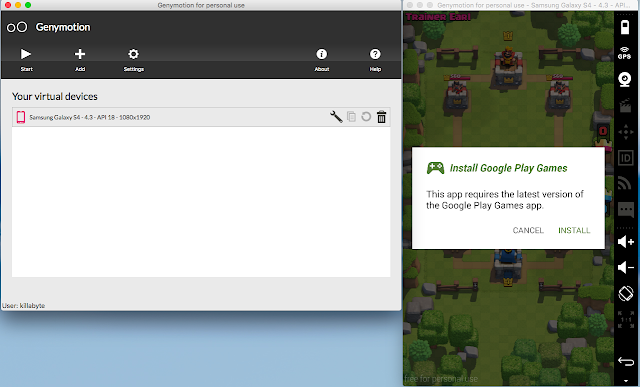
10. After successfully installing Clash Royale on your device, you will then be prompted to install Google Play Games. Click INSTALL to proceed, and then you'll be able to play Clash Royale on your device.


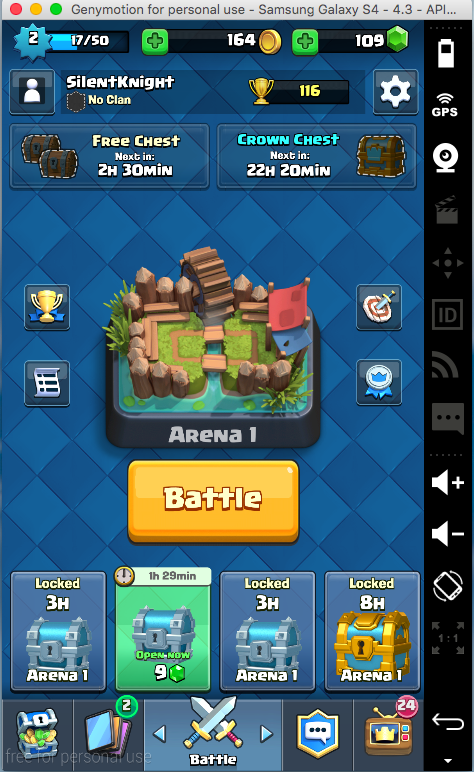
11. You can now sit back, relax and play Clash Royale on your Mac!


Wednesday, February 24, 2016

Popular Life Hacks in the Philippines


  • You can always ask for a free newspaper in the morning from McDo or Jollibee even if your bill is below the required minimum amount for a free one. They don't usually care. 
  • Mercury Drug sells bottled drinks and other packed foods that are a lot cheaper compared to 7-11 and Mini Stop.
  • Tired of queueing up at BPI? Take advantage of their express assist online service by scheduling withdrawal and deposit transactions.  
  • Food hacks - if you are working in Makati go buy your food in Jollijeep much cheaper - Hakwer 101, bang for the buck - Cheap massage? Go Nuat Thai for only 250 pesos. - Going to Enchanted Kingdom? There's a shuttle back and forth in Makati/Ayala MRT - Quick merienda? - Get a Turon in SM malls in Makati for 12 pesos only. - Grab Taxi or Uber - you need this to survive the Hell of Manila - Always look out for Grab Taxi coupon codes - Cheap Karaoke in Timezone - Easy tickets in Timezone just play "Big Drop". I managed to get like 5000 of tickets.
  • If you arrive at NAIA and the queue at the taxi rank is full, catch the free bus to Resorts World on the bottom level (you have to pretend you're going to check in) and then once you get to one of the resorts world hotels, ask the doorman at the hotel to flag you a taxi.
  • The BPI iOS/Android app has a "Transfer to Anyone" service that does not need for the transferee's account info to be enrolled. Just use wisely.

Thursday, February 18, 2016

Philippine Passport Renewal Appointment at MarQuee Mall 2016


The Department of Foreign Affairs - Satellite Office, Angeles City, located at MarQuee Mall, informs the public that starting 12 January 2016, all applicants who wish to apply will be required a confirmed appointment except for the following:

1. Senior Citizens   
2. Pregnant (with medical certificate)   
3. Persons with Disability (PWD) (PWD with card / ID)   
4. Baby ( 0-12 months old ) ( may include one (1) parent traveling companion legitimate )   
5. Minor seven (7) years of age (7 y / o and below)  (may include one (1) legitimate parent traveling companion)


How To Get An Appointment:

1. Go personally to DFA Angeles
    Mon - Fri (10am-12pm) (4pm-5pm)
    Sat (10am-12pm) (3pm-4pm)

or

2. Send an email with the following details to angeles.sat@dfa.gov.ph and attach a valid id picture (clear and readable):

Last Name:  
First Name:  
Middle Name:  
Complete address:  
Mobile number:

Sunday, June 21, 2015

Fallout Shelter: How To Get Infinite Lunchboxes


Fallout Shelter [AppStore] is an iOS mobile game where you create and manage your on vault as a overseer at Vault-Tec. The main objective is to expand your vault to gather resources, knowledge. and create a thriving community.

A player is rewarded a LunchBox upon completing certain missions and each LunchBox contains 4 Fallout Shelter cards (which can be any multiple of the following: Cap, Food, Water, Power, Weapon, Outfit, Dweller). A player can opt to buy one or more LunchBoxes with real money via iAPs but a certain redditor found a bug which allows a player to get an infinite number of LunchBoxes.

When starting the game out there is a bug that leaves you stuck in "Tutorial Mode". Basically in Tutorial mode every other "collect 50 resources" mission will give you a Lunch Box for a reward rather than caps, As long as you never finish the missions "equip a dweller with an item" (weapon or outfit) and you don"t finish the mission "Sell an item" then you'll have one mission slot that rotates between 3 other "tutorial quests" which have a lunch box reward 66% of the time. The 3 quests you get end up repeating in "tutorial mode" are "collect 50 food", "collect 50 water", and "level up a dweller".

Important to note: You can equip dwellers with weapons and outfits, and you CAN sell items.. but if you turn in those quests then the "tutorial mode" ends and the amount of lunch boxes you get from rewards drops drastically (to below 10%).

I ended up playing on a new vault today for about 4 hours.. in that span time i was able to build a 3 basement deep vault with 4 slots of fully upgraded power and water, which precisely give me 50 of each resource on the timer, and then i was also able to build a plethora of other rooms as well and get my population up to around 30, with 3 legendary dwellers. My economy is horrendously stable and I've opened somewhere in the ballpark of 50 lunchboxes.. I've obtained about 10 legendary cards and 55 or so rare cards. Its been fun.

In short, don't do the sell and item/weapon or the equip armor ones. It makes the third quest cycle between 50 water and 50 food and rank up dweller. Giving you infinite lunch boxes.

Wednesday, April 29, 2015

Here's How You Can Listen to DZMM AM Radio On Your iOS Device for Free


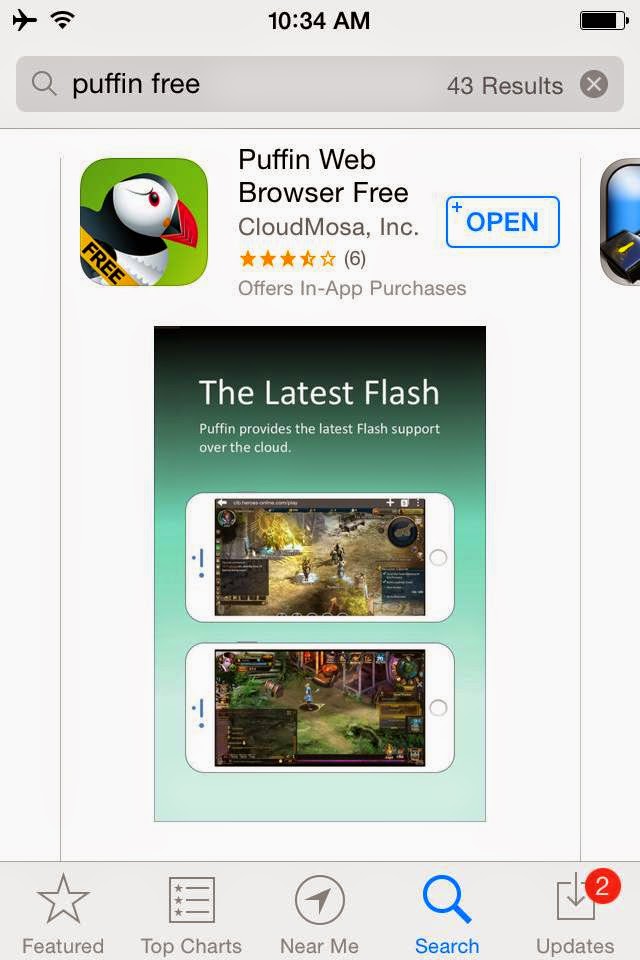
Step 1. Download the free Mobile Flash Browser iOS app - Puffin Web Browser Free (App Store)


Step 2. Copy and paste the following url http://dzmm.abs-cbnnews.com/page/audiostreaming.html on your Puffin Web Browser and wait for the page to load. Then press the play button to start listening to DZMM AM Radio station on your iOS device for free!

*You can also listen to the following AM and FM Radio Stations:

DZBB http://streema.com/radios/play/10139
DZRH  http://streema.com/radios/play/3378

Monster Radio RX 93.1 http://streema.com/radios/play/2031
Yes FM 101.1 http://streema.com/radios/play/13209
Magic 89.9 http://streema.com/radios/play/2360